
Resources
Help & articles
Guides, how-tos and news for your catering business.
Help topics
Quotes & Orders
Quote Templates
Send beautifully designed quotes. Choose from a library of bespoke templates, set defaults per order type or tag, and reorder the list to suit how you sell.
Send beautifully designed quotes to your customers. Choose from a library of bespoke templates, set defaults per order type or tag, and reorder the list to suit how you sell.
What is a quote template?
Every order in Puree can be sent to your customer using the Standard Quote view, or one of several bespoke templates designed for different event types — weddings, cocktail parties, corporate drops, fine dining, drop-off, and more. Each template has its own typography, layout, imagery and tone, so the quote always feels right for the occasion.
Selecting a template for an order
Open the order, then click Select Quote Template in the action bar above the quote.

A modal opens showing every template available to your account. Click any card to set it as the template for this order — the “Customer view” and “Copy link” buttons will then use that template. Click Preview on a card to open the template in a new tab and see exactly what the customer will see before you commit to it.
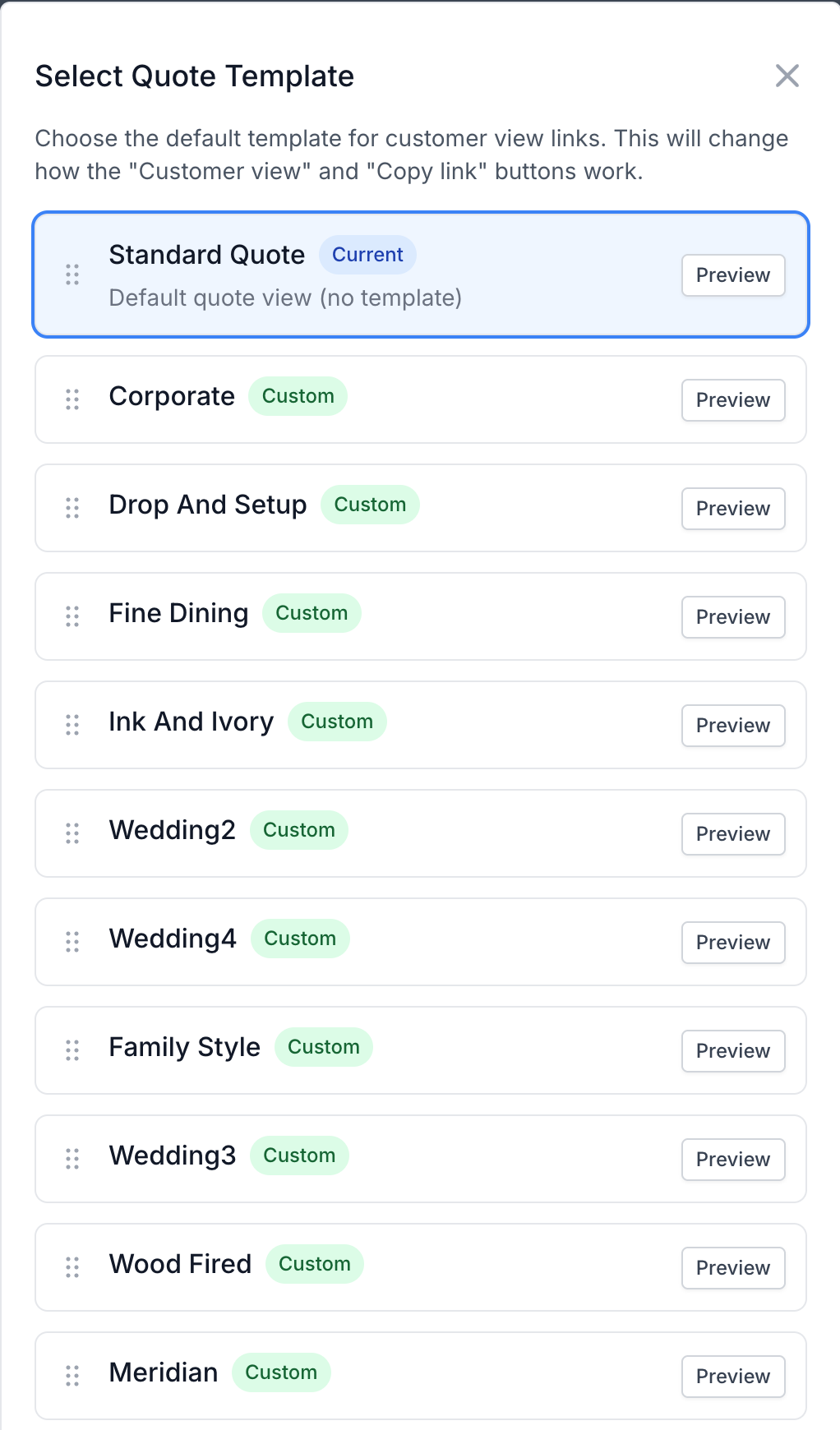
Once a template is set, the order header shows Quote template: <name> just below the status. That name is a link — click it to open a live preview of the currently selected template in a new tab, exactly as the customer will see it. If the template came from a default rather than an explicit choice, a small hint — (from tag) or (from order type) — appears next to the name so you can tell why that template is in use.
Reordering the template list
Each template card has a drag handle (six dots) on the left edge. Click and drag the handle to reorder the cards. The order persists for your whole account — everyone on your team sees the same arrangement next time they open the modal.
Defaults by order type
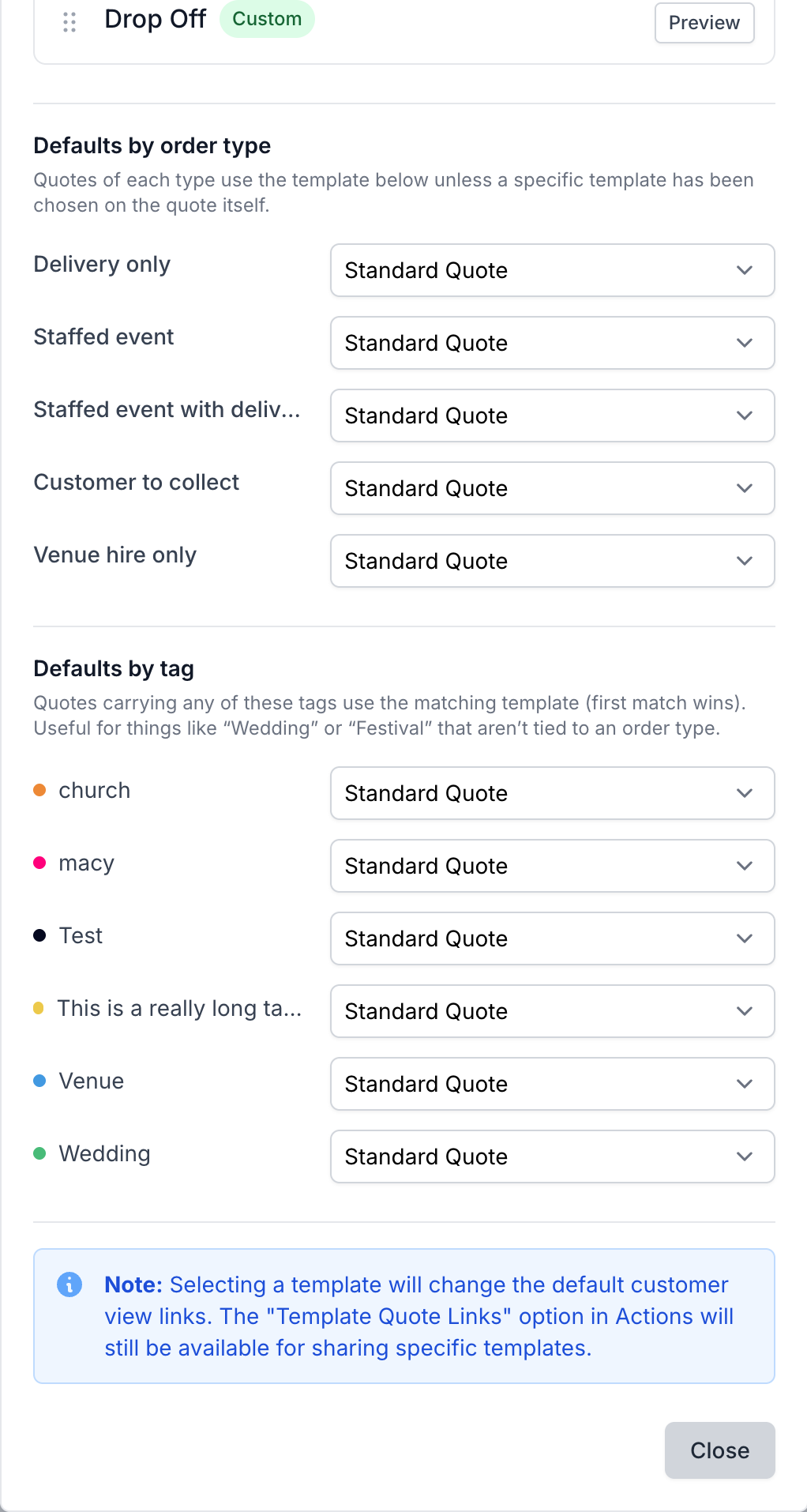
Scroll to the bottom of the same modal and you’ll find a Defaults by order type section. Each of the five order types — Delivery only, Staffed event, Staffed event with deliveries, Customer to collect, Venue hire only — has its own dropdown. Pick a template, and from then on any new quote of that type will automatically use it.
The selection saves the moment you change the dropdown — no save button needed. Setting a dropdown back to “Standard Quote” removes the default for that type.
Defaults by tag
For event styles that don’t map cleanly to an order type — weddings, festivals, anniversaries, milestones — use the Defaults by tag section. Every tag you’ve created shows up with its own dropdown. Map “Wedding” to your wedding template, and any quote tagged “Wedding” will use that template automatically.
Tag defaults beat order-type defaults when both apply. If a quote has multiple tags, the first matching tag (in the order saved on your account) wins.
How a quote picks its template
Puree resolves the template in this order:
- Explicit choice on the order — whatever you set in the top section of the modal wins.
- Tag default — if the order has a tag mapped to a template, that’s used.
- Order type default — if the order’s type has a mapped template, that’s used.
- Standard Quote — the built-in fallback.
You’ll see a small hint — (from tag) or (from order type) — next to the template name in the order header whenever an inherited default is in use, so it’s easy to tell why a particular template was chosen.
How we create templates for you
Templates aren’t something you build yourself in a drag-and-drop editor — every template in Puree is designed and hand-built by us, for your account. Real typography, real layout work, your brand, not a generic skin. Here’s how it works:
- Get in touch — tell us which template you’d like enabled, or brief us on a custom design. Browse the full gallery with live previews on our Quote Templates feature page.
- Send us your brand — logo files, colours, fonts, photography, and anything that captures your tone of voice. A mood board or an existing menu design works great too.
- We build it — our team designs the template and loads it directly onto your account. There’s nothing for you to install or configure.
- You review — the new template appears in your Select Quote Template modal with a Preview button. Open it against a real quote, send us feedback, and we’ll iterate — logo tweaks, wording, imagery, whatever it needs.
- Set it live — once you’re happy, pick it on an order or set it as a default by order type or tag, and every quote link you send uses it from then on.
Pricing
The Standard Quote view is included free with every Puree plan. Each bespoke template — Wedding 1–4, Cocktail Party, Fine Dining, Family Style, Live Stations, Corporate, Drop & Setup, Drop Off, Modern — is a one-off NZD $250 set-up fee to enable it on your account. Once enabled, there’s no per-quote cost: send as many quotes with that template as you like.
Need something only you can send? A fully custom-designed template — your brand, your typography, your tone of voice — starts at NZD $1,000. Bring a mood board or a design and we’ll build it. Contact us to start a brief.