
Menu Disclaimer: A General Statement on Every Customer Quote
By Andrew Hemphill · 24 August 2026
Caterers can now add a general disclaimer or statement that appears on every customer quote and menu PDF. This account-level setting lives in our Dietary Codes, Allergens & Menu Disclaimer help page and prints inside the Menu block on all your quotes.
What Is the Menu Disclaimer?
The menu disclaimer is a plain-text statement you can configure once and have it appear on every customer quote. Common uses include allergen warnings (“All dishes are prepared in a kitchen that handles nuts, dairy, and gluten”), sourcing notes, or general disclaimers your business needs to communicate.
This is not a per-dish note and does not replace our article Introducing Dietary Codes Feature in Puree.app. It is account-level, meaning the same statement prints on every quote until you change or clear it.
Where to Manage It
Go to our Dietary Codes, Allergens & Menu Disclaimer help page. You’ll see three tabs: Dietary Codes, Allergens, and Disclaimer. The Disclaimer tab is where you configure your statement.
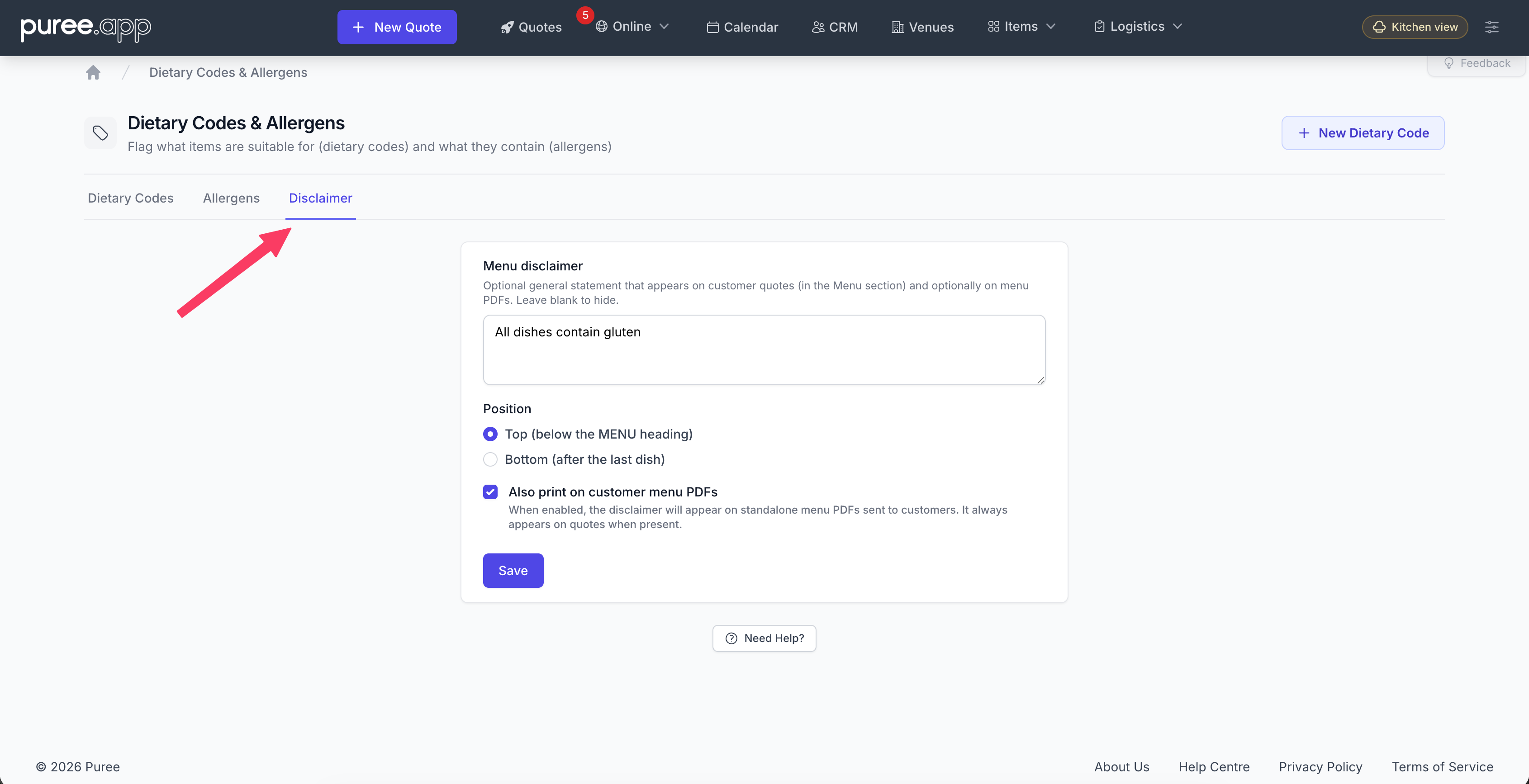
- Open the Disclaimer tab
- Type your statement in the text area
- Choose Top (below the MENU heading, before dishes) or Bottom (after the last dish)
- Optionally, tick Also print on customer menu PDFs if you want it on standalone menu PDFs (default is off)
- Click Save
Leave the text blank to hide the disclaimer. Once you clear the field and save, nothing prints.
Where It Appears
The disclaimer appears in the Menu section of customer quotes — both the HTML customer quote and the quote PDF. It does not appear on kitchen dockets, chef reports, or the online store.
- Position Top: Prints inside the Menu block, just below the MENU heading and before the first dish. If you have menu commentary, the disclaimer comes after that.
- Position Bottom: Prints inside the Menu block, after the last dish. This is still inside the Menu section, not after Staff or in the footer.
The disclaimer renders with a small uppercase “DISCLAIMER” label and the statement text in regular (non-italic) style. It is visually separated from menu items so it does not look like item commentary.
Every custom customer quote template (Dalton, Whisk, Example, and others) also includes the disclaimer in the same way — top or bottom placement within the Menu section.
Standalone Menu PDFs (Optional)
By default, the disclaimer only appears on quotes. If you want it on standalone customer menu PDFs too, tick the checkbox on the Disclaimer tab. This is off by default because the quote is the main surface for this copy.
What It Does Not Do
The menu disclaimer is customer-facing only. It does not appear on kitchen dockets, chef reports, or any internal paperwork. It is not a per-order override — every quote uses the same statement until you edit or clear it.
If you have questions about this feature, our Dietary Codes, Allergens & Menu Disclaimer help page or reach out to support.